Moras
- 4.4
- Rating
- 10.00K
- Installs
- Free
- Price

 Analysis by App-foxy
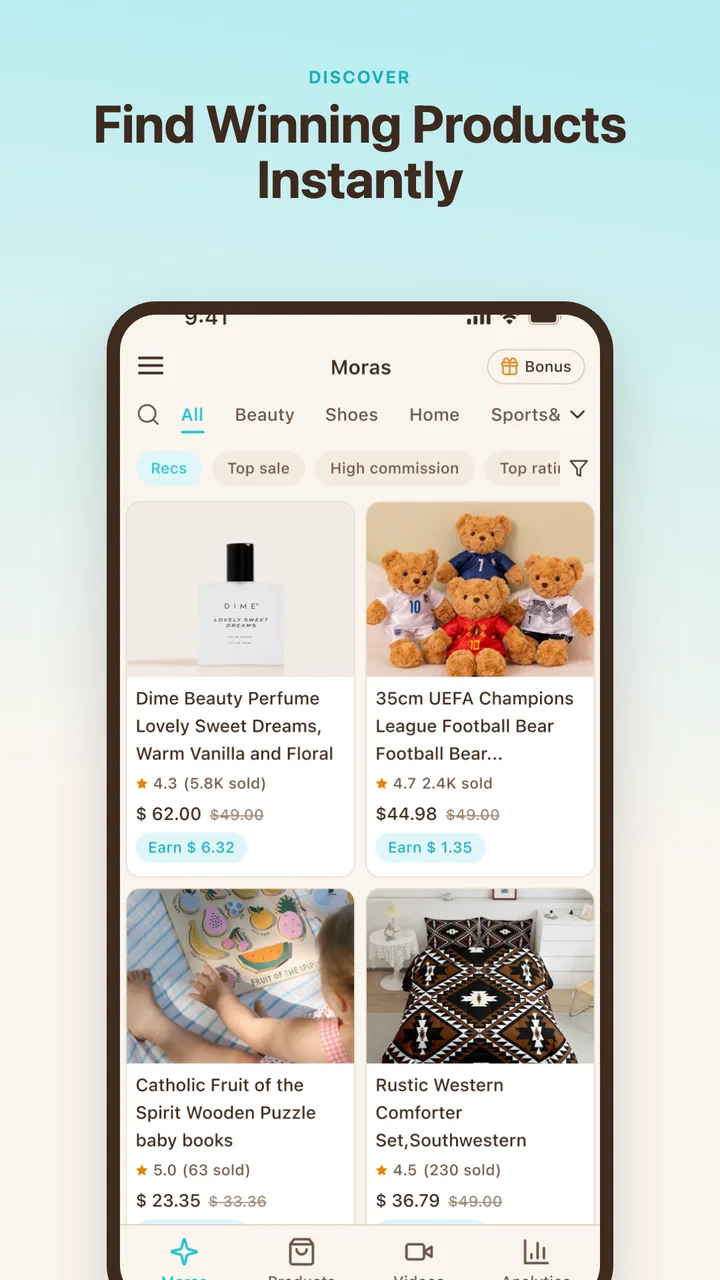
I tried Moras as a lightweight business app for turning product material into short-form TikTok content, and its appeal became clearest in a shared household setting. A small shop owner, a partner helping with social media, or a family member handling product photos can all contribute to the same content routine without needing a full video-editing background. The app is free, aimed at everyone, and published by k2lab, so the barrier to trying it is pleasantly low.
That does not mean it replaces a complete social media studio. I see it more as a practical bridge between having a product to sell and having a presentable video idea ready for TikTok. If your main problem is staring at a folder of product images and not knowing how to turn them into something watchable, this is where Moras makes sense. If you already work comfortably in a professional editor and need detailed control over every cut, layer, sound, and export decision, you may find its approach too narrow.
How Moras fits into a shared product-content routine
Imagine a normal evening in a small household business. One person has photographed handmade candles, clothing, baked goods, or second-hand items during the day. Another person has a better feel for TikTok pacing but does not want to learn a complicated editor. A third person may simply need to check whether the finished result presents the product clearly. Moras is useful in that handoff because it focuses attention on the product rather than asking everyone to become a video technician.
You May Also Like

 AccuWeather: Weather Radar
AccuWeather Review: A Quick, Clear Forecast for Everyday Decisions
For everyday plans, the best forecast is the one you can understand quickly. AccuWeather makes rain timing, radar, and local conditions easy to act on, with a few trade-offs.

 Hill Climb Racing
Why Hill Climb Racing Still Turns Crashes Into One More Run
A tiny car, a bumpy hill and one more upgrade: Hill Climb Racing keeps resurfacing because its simple chaos makes every near-miss feel personal.

 AliExpress - Shopping App
AliExpress Makes Global Shopping Feel Personal, but Shoppers Bear the Risk
AliExpress turns a global marketplace into a pocket-sized discovery engine. Its reach is useful, its shopping loop compelling, and its trade-offs easy to miss.

 Lords Mobile: Kingdom Wars
Lords Mobile Is a Kingdom-Building Routine, Not a Quick Match
A case-by-case verdict on the building, battles, device demands, and social commitments that make Lords Mobile rewarding for some players and exhausting for others.

 PDF Scanner app - TapScanner
TapScanner Makes Paperwork Easier to Capture, Check, and Share
TapScanner makes scanning with a phone feel less like a rescue operation and more like a dependable step in getting work done. Its capture tools are useful, though not flawless.

 Block Blast!
Block Blast! Shows How Much a Puzzle Game Can Leave Out
A quiet grid game shows why puzzle players increasingly value instant clarity, repeatable skill and low-pressure play—and where the genre still needs to catch up.
More From Our News Desk
View All News


In that situation, I would use it after collecting the basic material, not as a replacement for planning. I would first choose a small group of images that show the item from different angles, remove anything blurry or repetitive, and decide what the viewer should understand immediately. The app can then become the place where those materials are shaped into a short promotional piece. That division of labor matters: Moras can help with the content-making step, but it cannot decide whether the product photos are honest, useful, or attractive enough to begin with.
The strongest shared-device use case is a simple one. A seller prepares the product information, a helper assembles the visual story, and the owner reviews it before publication. This keeps creative work moving even when only one person is comfortable with editing. It also reduces the temptation to pass around a complicated project file from one desktop application to another.
There is a trade-off, though. Shared use is convenient only when people agree on what should be posted. Moras is not a substitute for a content calendar, an inventory system, or a conversation about brand tone. If several people use the same device, I would keep a clear naming habit for source images and finished clips. Otherwise, the real friction may come from choosing the wrong product material rather than from the app itself.
What the first session feels like
The experience is best approached as a focused workflow rather than an open-ended creative playground. I would not open it expecting the same depth as a traditional timeline editor. Instead, I would prepare the product material, follow the app’s direction toward a TikTok-ready result, and judge the output by one question: does it make the item easier to understand and more tempting to investigate?
That focus is valuable for people who procrastinate because editing feels technical. A short product video often needs only a clear opening image, a sensible order, readable information, and a finish that does not feel abrupt. Moras is positioned around that practical outcome. In my experience, a tool that narrows the decision-making can be more useful than one that offers hundreds of controls nobody in the household has time to learn.
At the same time, I would inspect every generated or arranged result before sharing it. A fast workflow can encourage people to accept the first version automatically. Product content still needs human judgment: check that the important detail appears early, that the item is not hidden by decorative treatment, and that the final video does not imply something the product cannot deliver.
Keeping setup boundaries clear
Because this is a business-oriented app used around personal devices, I would establish boundaries before making it part of a household routine. Decide which photos are work material, which files are personal, and who has permission to publish. That sounds obvious, but mixing family images with shop assets can make later organization unnecessarily awkward.
I would also give each person a defined role. One person can gather product images, another can review the wording or visual order, and the account owner can make the final posting decision. This is not about inventing controls that the app may not have; it is simply a sensible way to use any shared creative tool without confusing responsibility.
The app’s Everyone content rating makes it approachable in an age context, but that should not be mistaken for a complete business safety system. A younger household member might be perfectly capable of helping arrange images while still needing an adult to handle customer communication, pricing decisions, or publication. Moras can be part of a supervised creative task without becoming the place where all commercial decisions are left unattended.
For a shared phone or tablet, I would avoid leaving unfinished product material mixed with unrelated personal content. A separate device profile, folder structure, or clearly named workspace can make the handoff easier, depending on what your device supports. The important point is that organization around Moras may matter as much as the editing itself when several people contribute.
Coordinating product videos without slowing everyone down
A useful workflow is to create a repeatable checklist for each item. Start with the product name, select the clearest visual, add supporting views, and finish with a direct reason to keep watching or learn more. The exact creative treatment can change, but the order of decisions stays stable. This helps a household avoid spending twenty minutes debating small visual choices before confirming that the product is shown properly.
I also recommend separating approval from experimentation. Let the person who enjoys trying different combinations make drafts, but let the person responsible for the shop approve the final version. That arrangement protects the business from accidental uploads while keeping the creative process relaxed. Moras works better in this role as a production aid than as an authority on what your audience should see.
Another non-obvious advantage is that it can lower the social cost of asking for help. Someone who would never volunteer to edit a full video may be willing to turn a prepared product set into a short TikTok piece. In a family business, that can distribute work more fairly. The person with the strongest technical skills does not have to become the permanent bottleneck.
The weakness is that a focused app may leave you wanting more when coordination becomes complex. If you need comments attached to individual timeline moments, detailed revision history, or a central team library, a broader collaboration platform may be a better fit. Moras is easier to approach precisely because it does not try to be an entire production department.
Age, trust, and the human review step
I like that the app is presented for everyone, especially for households where a teenager or younger adult helps with product presentation. The visual task can be creative and educational: choosing a useful opening, noticing how framing affects attention, and learning that promotional content should explain rather than exaggerate.
Trust still needs to be earned through review. A child or younger helper may select a visually exciting shot that does not show the product accurately. An adult should check claims, prices, availability, and any customer-facing message before publication. This is not a criticism of Moras; it is the normal boundary between making a draft and representing a business publicly.
I would be particularly careful with products that have age-sensitive, health-related, or safety implications. The app’s general audience rating describes who can use the app, not whether every product is suitable for every viewer or whether every promotional statement is responsible. The final judgment belongs with the seller and the adult supervising the business process.
For shared accounts, clarity matters more than convenience. Everyone should know which account is being used, who can publish, and where the finished material is stored. If the same device is used for personal TikTok activity and business work, pause before posting and verify the destination. A polished clip sent to the wrong account is still a workflow failure.
Where it beats ordinary alternatives
The usual alternative is manual editing in a general video app. That route offers more freedom, but it also asks you to make many more decisions: canvas size, timing, transitions, text placement, music, and export settings. For a small seller who simply wants product content, that freedom can feel like homework. Moras has a clearer purpose, which makes it more approachable for occasional users.
Another alternative is hiring someone to produce every clip. That can deliver a more consistent visual identity, but it costs more and creates a slower feedback loop. Moras is more suitable when products change often, budgets are tight, or the owner wants to make quick drafts before deciding which items deserve a larger production effort.
Compared with a full professional editor, the likely benefit is speed of entry rather than precision. I would choose a professional tool for a campaign that depends on exact brand animation, carefully mixed audio, layered footage, or detailed color work. I would choose Moras when the main obstacle is turning ordinary product material into a usable TikTok concept without building a complex project from scratch.
There is also a middle ground: use Moras for the first version, then move only the promising ideas into a more advanced editor. That is a smart trade-off for a household business. It prevents you from spending serious editing time on products that do not look convincing on screen, while preserving the option to polish the strongest concepts later.
What the current release means for practical use
Moras is currently at version 1.1.14 and supports devices running Android 7.0 or newer. That broad compatibility makes it easier to include an older spare phone or shared tablet in the workflow. I would still test the complete process on the actual device used by the household, because a supported operating system does not automatically make every screen comfortable for long editing sessions.
The app has passed ten thousand installs and holds a 4.4 average from roughly eighty ratings, with around forty reviews. Those figures suggest that people are finding value in the basic idea, but they are not a reason to skip your own trial. A business workflow depends on details such as how quickly your material can be prepared, whether the result matches your style, and how much manual correction you prefer.
Since it is free, the sensible approach is to test it with low-risk material first. Choose a product that is easy to photograph and does not require a complicated explanation. Make a draft, watch it as if you were a potential customer, and ask whether the first moments communicate anything useful. If the answer is no, improve the source material and the message before blaming the tool.
That test also reveals whether the app suits the person who will actually use it. A shop owner may enjoy the speed, while a dedicated content creator may feel constrained. A teenager helping with visuals may find the focused process inviting, while someone accustomed to manual keyframes may want more control. The right judgment depends on the role, not just the feature list.
Everyday scenarios where I would recommend it
I would recommend Moras to a home-based seller who has several products ready but no reliable video routine. It can help turn a batch of still images into a starting point for short-form content, making the transition from catalog photography to social presentation less intimidating.
I would also consider it for a small retail team where one person knows the products and another understands visual presentation. The product expert can provide the right material and context, while the creative helper handles the draft. That division is especially useful when neither person wants to own the entire process alone.
A third scenario is seasonal testing. Before investing in a polished campaign, a seller can use a simple workflow to see which products are naturally easy to present on video. Items with clear shapes, useful details, or satisfying demonstrations may reveal themselves quickly. The app is valuable here not only for producing clips but also for helping decide where more production effort is justified.
I would skip it for a user whose work is mainly long-form video, cinematic storytelling, or detailed brand production. I would also skip it if the business depends on strict collaborative review and asset management across a larger team. In those cases, the limitations of a focused product-video app may create more work than they remove.
My household verdict
After looking at Moras through the lens of shared-device use, I see a practical app with a clear audience: people who have products to show and want a simpler path to TikTok content. Its free access, broad age positioning, and straightforward business purpose make it easy to introduce into a household or small shop without turning the process into a technical project.
My recommendation comes with one condition: keep the human approval step. Let different people contribute, but decide in advance who checks the product presentation and who has the final say before anything goes public. That small boundary protects trust, keeps personal and business activity separate, and makes the app more useful in real life.
The best reason to try Moras is not that it promises to replace every other editor; it is that it can make the first workable product video easier to create. For a beginner or a small household business, that may be exactly the missing step. For an experienced editor seeking complete control, a more advanced alternative will probably remain the better choice.
FAQs for Moras
01What is Moras, and what can I use it for?
Moras is a mobile application designed to help users manage and interact with its core features from an Android or iOS device. Depending on the version and region, it may provide tools for organizing information, accessing services, or completing everyday tasks in one place. Before downloading, check the official store description to confirm that the available features match your needs and device.
02Is Moras free to download and use?
Moras may be available as a free download, but some functions can require in-app purchases, a subscription, or payment for specific services. Store listings normally explain whether the app contains advertising, premium content, or optional upgrades. I recommend reviewing the pricing section and subscription terms carefully before confirming any purchase, especially if the application is intended for regular or professional use.
03Does Moras require an account or personal information?
The information required by Moras depends on how you use the application. Basic access may be possible without registration, while personalized features, saved data, synchronization, or service-related functions may require an account. During setup, review the permissions and privacy policy so you understand what information is collected, why it is needed, and whether you can use the app with limited data sharing.
04Is Moras compatible with my Android or iPhone?
Compatibility can vary according to the operating system version, device model, and the latest app update. Before installing Moras, open its official Google Play or App Store listing and check the stated requirements. Older phones may be unable to install the newest version or may experience slower performance. Keeping your operating system updated can also help prevent crashes and compatibility problems.
05Is Moras safe and reliable to download?
The safest way to install Moras is through its official Google Play Store or Apple App Store listing, rather than from unknown websites or modified installation files. Check the developer name, recent reviews, update history, and requested permissions before downloading. As with any app, avoid sharing sensitive information unless it is necessary, and keep both the application and your device software updated.
Pros
- Simple interface makes daily prayer tracking quick and easy.
- Useful reminders help maintain a consistent prayer routine.
- Supports reflection and mindfulness through regular spiritual practice.
- Lightweight app that should run smoothly on most modern phones.
- Suitable for users seeking a focused
- distraction-free experience.
Cons
- Limited appeal for users outside its intended spiritual audience.
- Reminder settings may feel too basic for advanced scheduling needs.
- Some features may require patience to understand at first.
- Personalization options appear limited compared with larger wellness apps.
- A stable internet connection may be needed for certain content or updates.

Moras
Gallery